Give your AI feedback it can read.
A VS Code extension that lets you annotate Markdown the way you would mark up a document: highlight, comment, request an edit, strike a line. The markers are plain text, so any LLM can parse them straight from the file.
Already in VS Code? Open the Extensions panel and search Ace AI Markdown Feedback.
The agent writes Markdown
Plans, docs, explanations. Artifacts you need to react to.
Free-form replies lose context
"Change the third bullet" leaves the agent guessing which one.
Annotate in place instead
Mark the exact text. The agent reads the markers and acts.
One keystroke each. Plain text underneath.
Select text in the preview and press a key. The marker is written into the Markdown source, so there are no sidecar files and nothing proprietary.
Highlight
Flag a passage for discussion without saying what is wrong yet. Press H.
Comment
Leave an inline note for the LLM. Hidden in the reading view, visible in the source. Press C.
Edit request
Ask for a specific change, rendered as a callout so it stands out. Press E.
Deletion
Suggest cutting a line or section. Shows as a strikethrough. Press D.
Annotate on the right. Source updates on the left.
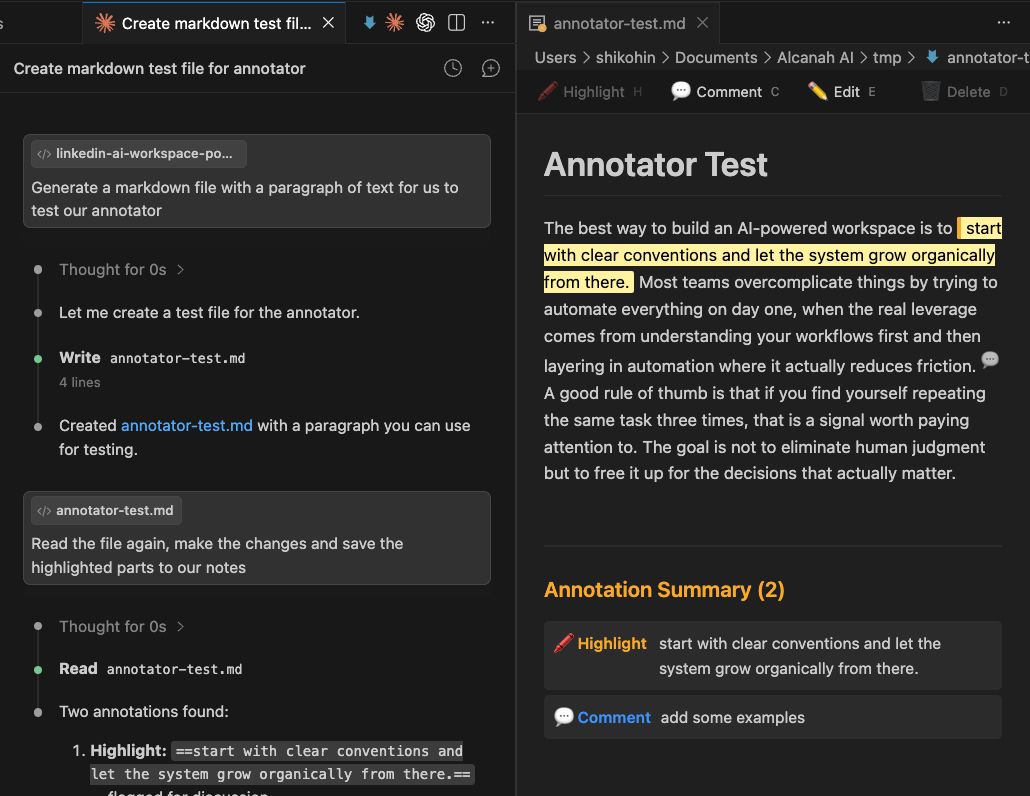
Review, hand back, repeat.
Open the preview
Cmd+Shift+P then "Ace: Open Feedback Preview", side by side with your Markdown.
Select and mark
Highlight text, then H, C, E, or D. The marker writes into the file.
Save
Cmd+S. Ace adds a one-time header telling AI tools to respect the markers.
Hand it back
Give the annotated .md to Claude, Codex, or any agent. It reads the feedback and acts.
Two ways in.
From the sidebar
Open the Extensions view in VS Code and search Ace AI Markdown Feedback. Click Install.
From the command line
code --install-extension AlfredNaayem.ai-markdown-feedback
Open any Markdown file
Works with Cursor, Antigravity, and VSCodium too, since they share the VS Code extension format.
Mark it up. Hand it back.
Free, MIT licensed, and the markers stay in plain text you can read without the extension.
Install from MarketplaceOpen source on GitHub. Star it, file an issue, or send a pull request →